Search Maya Zest


Friday, February 15, 2019

Maya render setting blank!


Just switch the script type in the bottom left corner of maya from Python to MEL,

paste this into the field

deleteUI unifiedRenderGlobalsWindow;
buildNewSceneUI;

Press Enter and the windows should refresh.

Thursday, October 4, 2018

Script to select random faces on your object (MAYA)


Select your object, Copy this into your mel  script into the mel box and hit enter it will take a moment and select random faces!


 string $faces[] = {};
  float $selectPercent = 0.10;
  for($each in `ls -sl`)
  {
  int $nFaces[] = `polyEvaluate -f $each`;
  int $sFaces = $nFaces[0] * $selectPercent;
  for($i=0;$i<$sFaces;$i++)
  {
  string $rFace = $each + ".f[" + int(`rand 0 $nFaces[0]`) + "]";
  while(stringArrayContains($rFace, $faces) == 1)
  {
  $rFace = $each + ".f[" + int(`rand 0 $nFaces[0]`) + "]";
  }
  $faces[size($faces)] = $rFace;
  }
  }
  select -r $faces;


Change $selectPercent = 0.10 to whatever percentage you’d like. It’s currently at 10%. This works across multiple objects and will select a percentage of faces per object, not a percentage of the total faces.


This was graciously created by Byterunner

https://forums.cgsociety.org/t/script-to-select-random-faces-on-object/1384634/4


Thanks buddy!

Friday, December 8, 2017

Create handheld camera shake After Effects with a simple wiggle expression.


You can use a simple wiggle expression on position to emulate some nice camera shake in after effects very easily.

The first two properties supplied to wiggle (frequency and amplitude) are required for the expression to work, the rest of them are optional. If you supply a value for the 3rd property in the wiggle you can increase the number of octaves from the default:

wiggle(1, 10, 3);


You can pull up the graph editor to see the wave form that is created!

The above, for example, will wiggle with a frequency of 1 Hz, an amplitude of 10 but with 3 octaves. This is similar to the "Complexity" of the Fractal Noise effect. It will preserve the overall effect of the wiggle but create additional "sub-wiggles" that add detail.
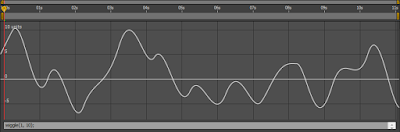


Here's an image of a wiggle() with 1 octave:


And here's a wiggle() with 3 octaves:
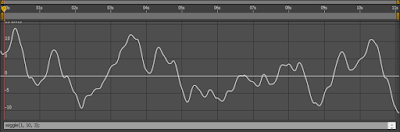


Note that both curves follow the same basic path, but the one with 3 octaves has more "sub-wiggles." If you want to reduce or increase the effect that these additional octaves have you can add a 4th property to wiggle():

wiggle(1, 10, 3, 0.2);

The default value is 0.5. A value of 0.2 would reduce the effect that the additional octaves have on the total wiggle.


For more control functionality you can create a slider control and then pick whip from one of the  numbers in your wiggle set to the slider control, to make keyable changes in the motion.

Special thanks to Darby Edelen, I gleaned this from a forum post he made.

Thursday, November 9, 2017

After effects fade in and out expressions

Just alt click on the little clock for the opacity of the layer you want to fade on the in and out points of your layer and paste these expressions.


FADE on IN and OUT
fadeInTime = .5; // fade in time (seconds)
fadeOutTime = .5;

Math.min(linear(time,inPoint,inPoint + fadeInTime,0,100),linear(time,outPoint - fadeOutTime,outPoint,100,0))


JUST FADE ON OUT
if(time<(this_layer.out_point -0.5)){
    transform.opacity;
} else {
    ( (this_layer.out_point-time)/0.5) * transform.opacity;
}