Search Maya Zest


Showing posts with label tip. Show all posts

Monday, December 27, 2021

Blender select every other edge loop


If you are in blender keymap mode (CTRL ALT will not do this in industry keymap set) 

Blender keymap top edit menu>Preferences>Keymap>Blender in the top

Hold CTRL and ALT then double click an edge loop.


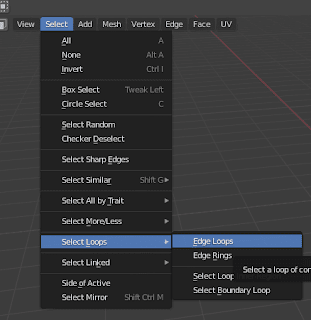
Then choose select Checker deselect


Then shoot select loops>edge loops


There you have it!


Friday, December 24, 2021

Easy Blender Object move pivot point (origin) without using curser!

So I just discovered this! Everywhere online tells you to try and use the curser to change the pivot center point of your game object but there is a MUCH easier way!

Simply click the little options menu in the top right corner of the view, and choose "affect only origins". BOOM you can now translate the origin point of your game object!


Monday, February 20, 2012

Scale or Transform ONLY selected faces from center of faces not entire object (Maya)

There is a little tool you have to select to scale only the faces from their own center and not the entire object. as shown in these examples.

Right click and hold in the view port choose "object select" in the quick menu. Select your object, then right click hold and go to faces selection. Select the faces you want to scale. Then in the top menu go to Edit Mesh>Transform Component.

(UPDATE THIS IS NOW CALLED SIMPLY TRANSFORM in the menu)

Please check "HELPFUL" below if it was, if not COMMENT below and tell me why! Don't miss another tutorial or tip! Subscribe to Maya Zest


Saturday, September 3, 2011

Fixing Faces with zero map area Problem in Maya

I've run into an interesting issue when creating models for I-phone 3D display. The model works fine in PVRshamman but once in code crashes. Once solution proposed online is to do a "cleanup" operation in Maya. Upon trying to do this however I notice that shapes with "zero map area" are disappearing from my model on cleanup. It seems to happen if the object doesn't have full UV co-ordinates assigned. Therefore here is the solution.

Select your object, then with the Polygons main sub menu selected in the left. Go to Create UV's>automatic mapping.

This will give the entire object some form of UV mapping. Then upon cleaning up Faces With Zero Map area you won't lose geometry. Hope that helps someone out!