So first off, if you are an amateur game designer you probably have no business trying to use normcore to make your game. However, if you are a glutton for punishment and you want the coolest possible tool for creating a game in unity with networking and multiplayer features it does some things VERY well.
Autodesk Maya, Unity, VR, Playmaker, Blender, After Effects and V-ray for Maya tutorials, tips and tricks
Search Maya Zest
Friday, October 22, 2021
Non-coders guide to making a VR game with Normcore, VRIF and Unity Part -1
Changing Direction of Mayazest Blog
Hey everyone who might find yourself in this neck of the woods. This post is to just mention a bit of a change in direction for this blog. We will still be posting Maya tips most likely but because the times they be a changing, there are going to start being a lot more Unity and even Blender info on this blog as well. I know BLENDER? Over the last 3 years blender has become ALOT more like Maya, so this isn't as absurd as it used to be.
So before you break out the tar and feathers let's talk for a moment about why!
So for starters maya costs $200 a month to use now which didn't used to be the case before they switched to a subscription model. So we will also be posting tips about how to use Blender if you are from a maya users standpoint. We are also beginning to slant more into game development instead of Visual effects here at maya zest so that's another reason things will be changing a bit.
Hope you enjoy your day and keep on zesting!
Wednesday, September 29, 2021
Blender: Parent mesh to bones/armature and weight paint vertex groups
To parent your mesh to bones/armature: in Object Mode, select your Mesh FIRST then shift select the armature/bone you want to connect, right click over the mesh, choose "parent" and either "empty groups" or "auto groups".
After this, to go to weight paint: in Object Mode select armature/bone FIRST then your mesh then go to weight paint mode. Go to the "object data properties" tab (little green triangle) and you will see vertex groups. Select one and paint on it, this is applying weight to that vertex group.
To remove a section from a vertex group: Got to "Edit Mode" select the vertex group you want to remove something from, select the area on the mesh you want to remove from the vertex group by drag selecting. Over in the vertex group green triangle tab, click "remove" button below the vertex group list.
Wednesday, September 30, 2020
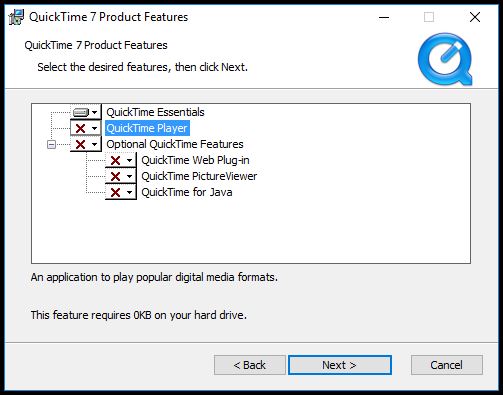
Quicktime playblast option not available in maya
Just install the codec and don't bother with the QT player itself. Then restart maya and it should show up now.
https://support.apple.com/kb/DL837?locale=en_US